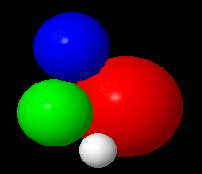
ColorMap
Particleview takes a
colormap, in order to inform
Particleview the mapping
relationship between a float number
and a color in the colormap.
A colormap is a file named
colormap.map.
In order to make it work, we should
put it in the root folder of
Particleview (name as Jmol because
we inherit from Jmol).
A colormap example is
given below:
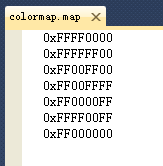 This colormap contain 7 colors as 0 1 2 3 4 5 6
Mapping:
If we have 3 atoms
A1(x1,y1,z1,r1,1.0)
A2(x2,y2,z2,r2,3.5)
A3(x3,y3,z3,r3,2.0)
Now we get the lowest bound
1.0(LB), the highest bound: 3.5(HB),
colornumber-1:6(CN).
Atomcolor = [(c1-LB)/(HB-LB)*CN]
([] stand for get the floor number)
That means A1 get color
0(0xFFFF0000), A2 get color
6(0xFF000000), A3 get color 2(0xFF00FF00). |